I recently spent some time with Waves Atlas Reverb, testing it across vocals, drums and a few different mixes, and I wanted to share my thoughts.
Reverb is already one of the most crowded plugin categories, so the real question for me was: do we actually need another one?
In this Waves Atlas Reverb review, I’ll also look at whether it offers enough to earn a place in your plugin folder. By the end, you should have a good idea whether Atlas deserves a place in your plugin folder.
What is Waves Atlas Reverb?
Waves Atlas Reverb is a fully algorithmic reverb designed to create everything from small rooms and plates to huge halls, cathedrals and more creative atmospheric spaces.
Instead of using impulse responses captured from real rooms, Atlas generates its spaces in real time using algorithms. This gives the reverb more movement and flexibility while still keeping the workflow simple.
The categories include Halls, Rooms, Plates, Chambers, Cathedrals, Springs, Spatial effects and more creative Dreamscapes.
How Does Waves Atlas Reverb Work?
Atlas is built around different reverb programs, so you don’t need to create a space from scratch. You simply choose a preset that gets you close to what you want and then shape it from there.
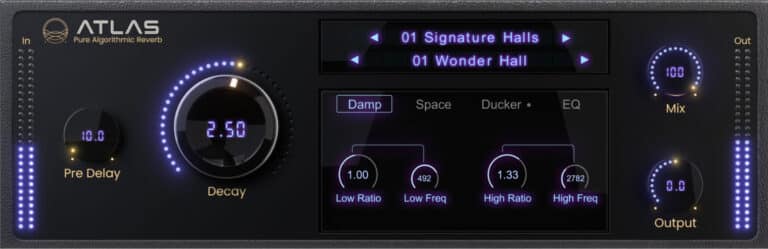
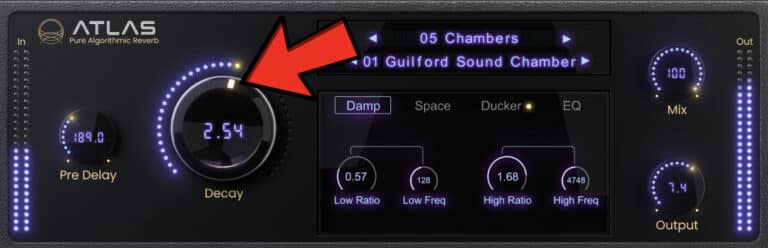
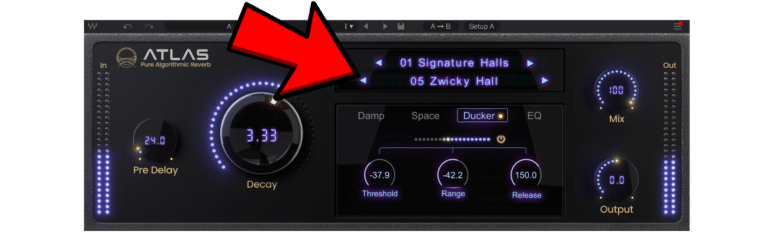
The main controls are Pre Delay, Decay, Mix and Output, while the Damp, Space, Ducker and EQ sections give you more control when needed.
For me, this makes Atlas quick to work with. I normally find a preset I like, adjust the Decay and Pre Delay, and only go deeper if the sound actually needs it.
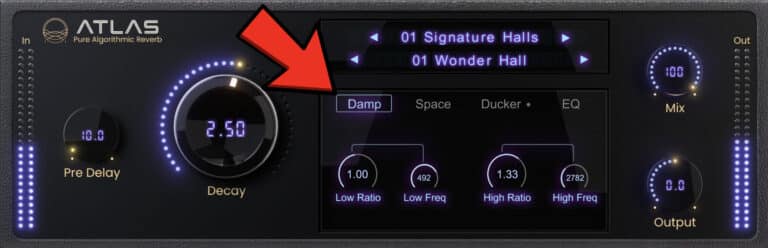
Damp Controls
The Damp section controls how the low and high frequencies decay inside the reverb.
This is different from simply EQing the reverb afterwards.
For example, you can make the low frequencies disappear faster to stop a long reverb from becoming muddy.
You can also make the high frequencies decay faster for a darker sound, or keep them around longer for something brighter and more open.
This is particularly useful on vocals, where too much low-end buildup or a very bright tail can quickly clutter the mix.
Shaping the Space
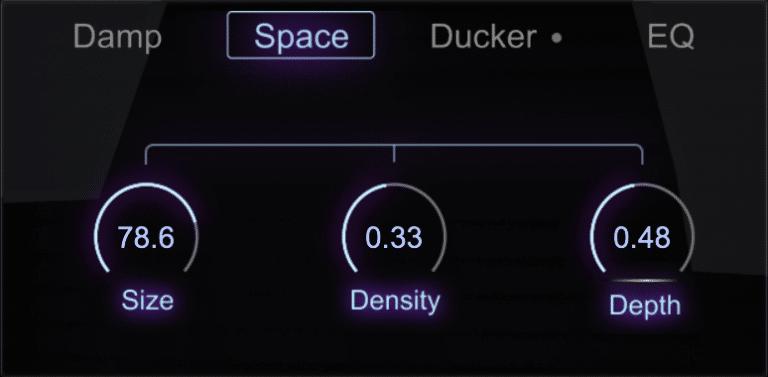
Atlas gives you three main Space controls: Size, Density and Depth.
Size changes the perceived size of the reverb.
Density controls how smooth or separated the reflections feel. Higher settings create a thicker, smoother tail, while lower settings make the reflections more noticeable.
Depth controls the modulation inside the reverb. Higher settings can add more movement, width and pitch variation.
For natural rooms I would normally keep this more controlled, while synths and atmospheric sounds can handle much more Depth.
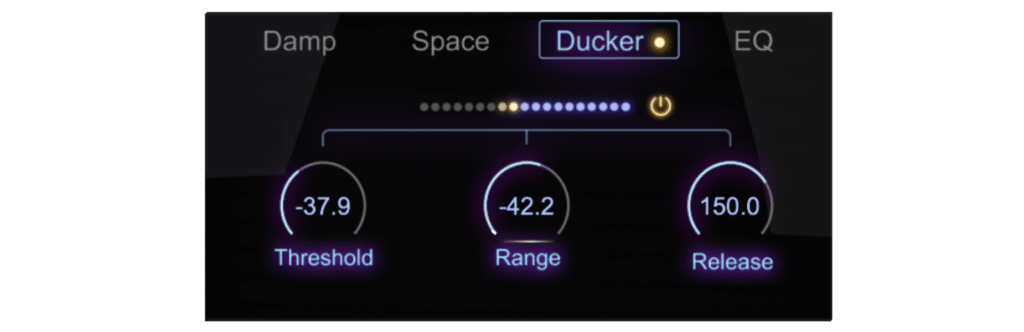
The Built-In Ducker
For me, the built-in Ducker is one of the best features in Atlas.
Technically, it works a lot like a sidechain compressor on the reverb. When the vocal or instrument is playing, the dry signal triggers the Ducker and automatically reduces the reverb. When the source stops, the reverb comes back. This lets you use a larger reverb without constantly covering the vocal.
Threshold decides when the ducking starts, Range controls how much the reverb gets reduced and Release controls how quickly it comes back.
You can build the same setup manually with a compressor and sidechain routing, but having it directly inside Atlas makes the whole process much quicker.
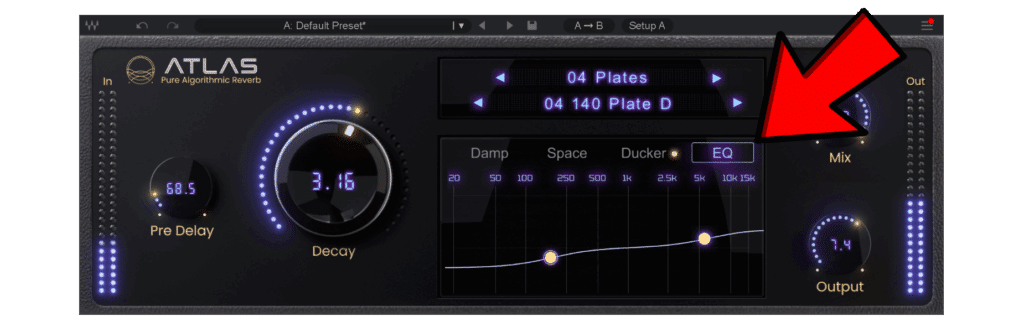
Reverb EQ
Atlas also includes a simple EQ for shaping the final reverb signal.
I would normally remove unnecessary low frequencies from a vocal reverb so it isn’t competing with the kick, bass and lower part of the vocal.
The high-frequency control can make the reverb darker or add more brightness.
The important difference is that Damp controls how frequencies decay over time, while EQ changes the final tone of the reverb.
Best Uses for Waves Atlas Reverb
Vocals: I think vocals are one of the best uses for Atlas, especially as part of a modern vocal chain. Use Pre Delay to keep the vocal upfront, Damp to control the tail and the Ducker if the reverb starts covering the words.
This lets you create quite a large vocal space without losing clarity.
Drums: Short rooms work well for adding some space around dry drums without making the reverb too obvious. For larger drum reverbs, I would mainly watch the low-frequency decay so the kick and toms don’t make everything muddy.
Synths and Pads: This is where you can push Atlas much harder. Long Decay, bigger Size settings and more Depth can create wide atmospheric sounds. The Dreamscape, Cathedral and Spatial programs are especially useful here.
Guitars: Rooms, plates and chambers are good starting points for guitars. A small amount can add depth without changing the original guitar too much.
Insert or Send? You can use Atlas directly on a track or on an aux. On an insert, use the Mix control to blend the dry and wet signal.
For vocals, I would personally use it on an aux most of the time, set Atlas to 100% wet and control the amount using the send level in the DAW.
My Favourite Waves Atlas Reverb Presets
A few presets stood out to me straight away.
For vocals, I particularly like Signature Halls > 05 Zwicky Hall. Used subtly, it can give that expensive, polished kind of space that works really well for certain hip-hop vocal styles. It adds depth and can make the vocal feel a little more open and crispy without sounding obviously drenched in reverb.
On drums, especially snares, 04 Plates > 12 Snare Plate is another great one. It adds size and sustain while keeping the snare hit clear and upfront. For me, it is the kind of preset that can make a dry snare feel more finished very quickly.
For synths, I really like 08 Dreamscapes > 02 You Are Surrounded. It gives certain synth sounds a wide, slightly hazy space and, to my ears, there is also a subtle analog tape-like vibe to it. On the right sound, it can add a lot of character and atmosphere without needing much tweaking.
Waves Atlas Reverb Price
At the time of writing, Waves Atlas Reverb costs $99.99, reduced from its regular $149 price.
At around $100, I think the real question is whether Atlas offers enough over the reverbs you already own. For me, the presets, built-in Ducker and simple workflow are the main things that make it worth considering.
Check the current Waves Atlas Reverb price [here].
My Opinion on Waves Atlas Reverb
For me, the biggest advantage of Waves Atlas Reverb is the workflow.
I don’t really want to spend ten minutes building every reverb from scratch. Most of the time I want to find something that already sounds good, make a few adjustments and move on. Atlas does that very well. The presets get you close quickly, while the Damp, Space and EQ sections still give you enough control when something needs changing.
I also really like the built-in Ducker. I use this technique a lot in advanced vocal chains, and having it inside Atlas saves extra compression and routing.
Making the high frequencies decay faster is not the same as simply cutting them with an EQ, and Atlas lets you control both.
Is Atlas doing something completely new that no other reverb can do? No.
But Atlas combines the controls I use most into a simple workflow, which is probably its biggest strength. I see myself using it most on vocals, drums and instruments where I want to create depth without pushing the original sound too far back.
Like any reverb, I wouldn’t choose a preset just because it sounds huge in solo. The real test is whether it still works when the entire mix is playing.
Overall, Waves Atlas Reverb is easy to use, sounds versatile and gives you enough control without turning reverb setup into a science project.
If you mix a lot of vocals or you want one algorithmic reverb that can handle both normal mixing and more creative spaces, Atlas is definitely worth checking out.
Want to try Waves Atlas Reverb? Click here to check it out and support our work at Dxt3r Lab!

-
Sale!

Suno AI Mastering Presets | Master Plan
£39.99Original price was: £39.99.£19.99Current price is: £19.99. Add to cart -
Sale!
Hip-Hop Vocal Chains Pro | Logic Pro
£99.99Original price was: £99.99.£39.99Current price is: £39.99. Add to cart -
Lil Wayne Type Vocal Chain | Waves
£9.99 Add to cart -
Gunna Type Vocal Chain | Waves
£9.99 Add to cart