
I’ve been mixing records for over 10 years, worked with thousands of artists, and I’m about to save you months of trial and error. Everyone is searching for “the best mixing template” or “the best mixing templates.” But 99% of what you download sounds amazing in the demo… and then falls apart the second you drop your own stems into it.
Here’s why — and how to fix it in a few minutes.
The best audio mixing templates in the world are optimized for a specific input level on each channel — not just the master.
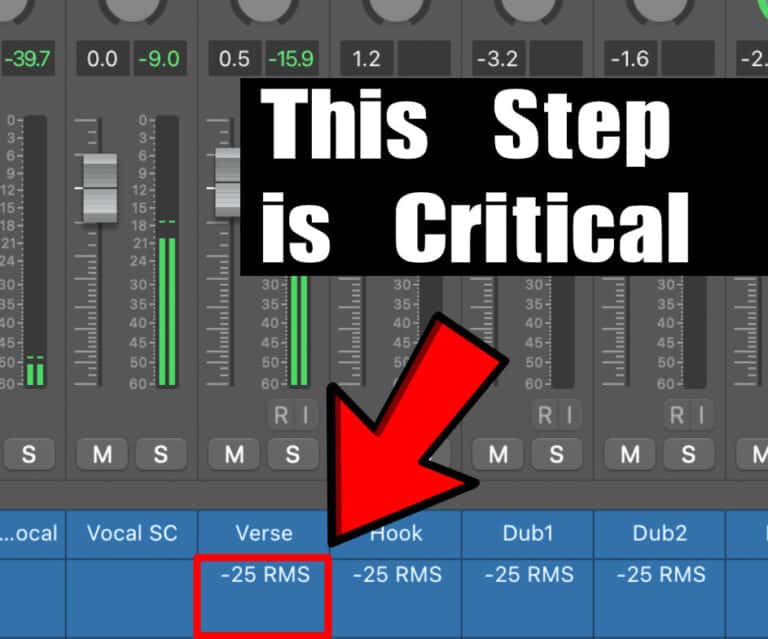
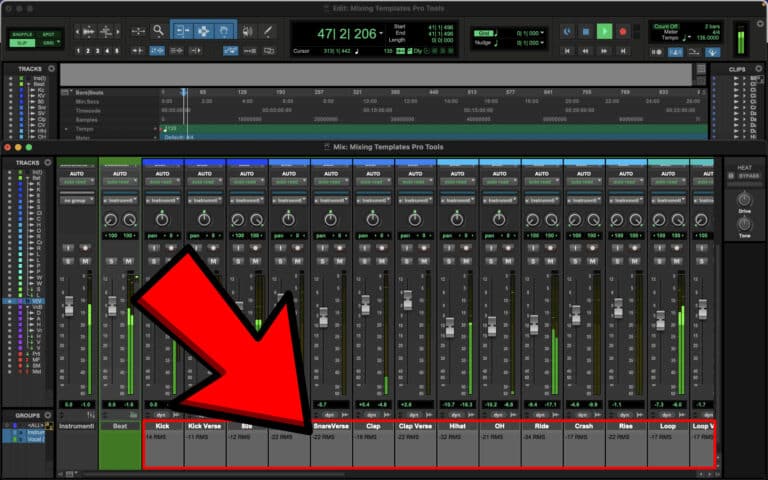
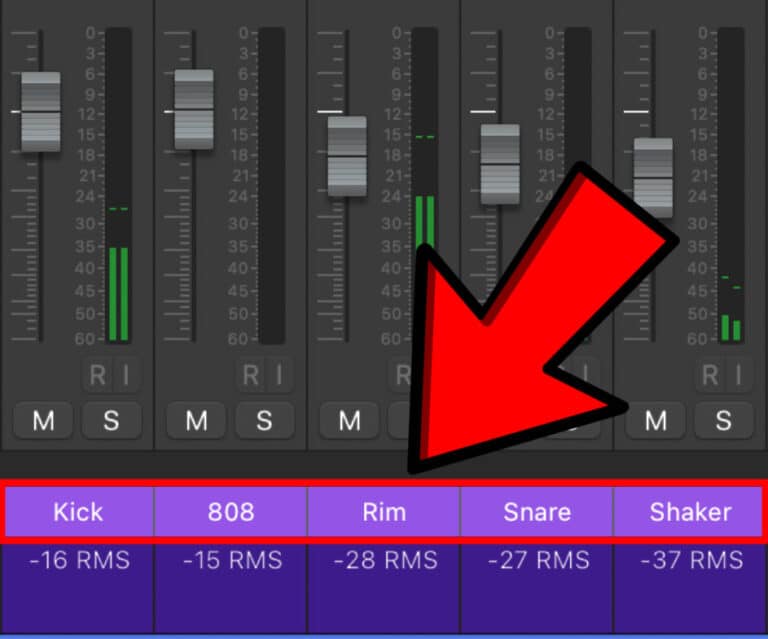
For pro mixes, every stem needs to hit its channel at the exact target level your template expects (clearly marked in LUFS Short-Term, RMS, or both) before any processing touches it.
If your audio hits too hot or too quiet →
compression reacts wrong, saturation breaks, EQ curves fall apart, and the whole mix feels messy, harsh, or small.
This is why every one of my mixing templates — Logic Pro, Ableton Live, and Pro Tools — includes:
✔ Per-channel input gain notes
✔ Clear LUFS targets for Vocals, Drums, Instruments, Bass, FX returns
✔ Color-coded gain staging markers
✔ A master “Gain Prep” section before your chain even begins
No guessing, no eyeballing meters, and no wondering why your mix suddenly sounds nothing like the demo.
The Best Mixing Template, The Best Mixing Templates, Best Logic Pro Mixing Template, Best Ableton Mixing Template, Best Pro Tools Mixing Template
Drop your stems into the audio channels
Place a loudness meter (WLM Plus, Multimeter, or Live’s meter) on each track
Adjust the pre-gain until each stem hits the exact target level marked in your template for LUFS Short-Term and/or RMS.
Start mixing — and be shocked at how good it sounds immediately
That’s it.
Set the gain correctly → the entire template comes alive.
Here’s why my templates actually work right out of the box — unlike 90% of what’s being sold.
I built three fully-featured Pro Mixing Templates, each one tailored for a different DAW and available in both stock/native and full Waves plugin versions:
🎚 Logic Pro Mixing Template / with Waves plugins
🎚 Ableton Live Mixing Template
🎚 Pro Tools Mixing Template / with Waves plugins
And every template includes:
• Exact per-channel input gain targets
• Genre-optimized busses (Pop, Hip-Hop, R&B, EDM, Rock)
• FX chains designed to “just work”
• Pre-routed stem groups with intelligent routing
• Clean, simple labeling so you don’t get lost
• Dedicated Output Gain section so you can match loudness without breaking your gain staging
In Ableton, Logic and Pro Tools one knob can change the tone of the entire group — glue, brightness, punch, warmth.
Perfect for producers, artists, and engineers who want big, clean, expensive mixes—without spending 10 years learning routing wizardry.
If you downloaded a “pro mixing template” and there’s:
✘ No recommended gain targets
✘ No routing explanations
✘ No labeled busses
✘ No gain staging prep
✘ No lookup chart for channel input levels
…then it wasn’t built for real mixes.
I’ve seen templates selling for $150 with random plugins thrown in with zero intention.
Hard pass.
After wasting money on pretty-looking templates that were unusable in real sessions, I realized the problem:
They were made for the creator’s stems, not yours.
So I spent 18 months studying the actual mixing workflows used by major engineers for artists like:
• Drake
• Billie Eilish
• Travis Scott
• Adele
• Post Malone
• SZA
…and rebuilt their routing, gain staging, and bus structures from scratch in:
✔ Logic Pro
✔ Ableton Live
✔ Pro Tools
Each template includes:
• Exact gain staging specs for every channel
• Bus processing modeled after real engineer chains
• Pre-routed FX for vocals, drums, instruments
• “Mix Character” macros for fast tone changes
• Zero guesswork
• Ready in seconds
Now thousands of producers and artists use my templates as their go-to starting point because they finally get mixes that sound professional — without hating the process.
The mixing template you bought won’t save a bad gain stage.
The best mixing templates:
✔ Make gain staging foolproof
✔ Give you pro bus routing
✔ Work for real stems, not just demos
That’s exactly what I obsess over when building mine.
If you’re tired of templates that look cool but fall apart when you import your own tracks, grab one of mine.
They’re crafted for real artists and producers mixing in real bedrooms — not YouTube demonstrations.
DM me @dxt3r_Lab on IG
or email contact@dxt3r.com
— I actually reply.
Let’s make your mixes sound expensive.
— Dxt3r
| Cookie | Duration | Description |
|---|---|---|
| cookielawinfo-checkbox-analytics | 11 months | This cookie is set by GDPR Cookie Consent plugin. The cookie is used to store the user consent for the cookies in the category "Analytics". |
| cookielawinfo-checkbox-functional | 11 months | The cookie is set by GDPR cookie consent to record the user consent for the cookies in the category "Functional". |
| cookielawinfo-checkbox-necessary | 11 months | This cookie is set by GDPR Cookie Consent plugin. The cookies is used to store the user consent for the cookies in the category "Necessary". |
| cookielawinfo-checkbox-others | 11 months | This cookie is set by GDPR Cookie Consent plugin. The cookie is used to store the user consent for the cookies in the category "Other. |
| cookielawinfo-checkbox-performance | 11 months | This cookie is set by GDPR Cookie Consent plugin. The cookie is used to store the user consent for the cookies in the category "Performance". |
| viewed_cookie_policy | 11 months | The cookie is set by the GDPR Cookie Consent plugin and is used to store whether or not user has consented to the use of cookies. It does not store any personal data. |